Magstor Thunderbolt 3 Lto Drive Honest Review — Is the Hype Justified?
I've been using the Magstor Thunderbolt 3 LTO drive for several months now as the backbone of my local archive and media backup workflow. I bought it because I wanted a fast, portable tape solution that would work directly with my MacBook Pro and a Windows workstation without the complexity of rackmount hardware and SAS controllers. After roughly four months of daily use—including large video archives, multi-terabyte incremental backups, and a handful of restoration tests—I feel ready to write an honest review about whether the hype around this product is justified.
Why I chose a Thunderbolt LTO drive
First, some context on my needs: I handle long-form video projects and have an ever-growing archive of raw footage. Cloud is expensive at this scale and long restores are impractical, so I wanted an on-prem solution that balances longevity, cost-per-GB, and portability. LTO tape meets those requirements—LTO cartridges are cheap per TB and have a well-understood lifecycle. The reason I picked a Thunderbolt model rather than a rackmount SAS drive is simple: convenience. I wanted a drive I could plug into my laptop on location, run a backup or archive job, and carry the unit with cartridges in a padded case between studio and home.
Unboxing and first impressions
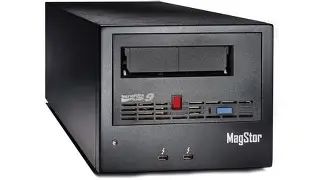
Out of the box, the Magstor Thunderbolt 3 LTO drive comes in a compact metal chassis that feels solid and slightly heavier than a typical external SSD. The unit includes a Thunderbolt 3 cable and a power brick (it does not run bus-powered, which I expected). I appreciated that the packaging kept the drive and cartridge snug—small, practical touches that matter when you plan to travel with the unit.
My very first step was firmware and driver checks. Magstor provided firmware updates and a small driver package on their support page. Installation was straightforward on Windows 10 and macOS—after updating firmware and installing the LTFS (Linear Tape File System) driver, the drive mounted like an external disk when using LTFS-formatted cartridges. That made daily operations much easier: I could copy directories directly to tape without bespoke backup software.
Setup and real-world workflow
Here’s how I used the device in practice:
- I mounted LTFS cartridges and copied folders directly using Finder and Explorer for manual archiving.
- I configured scheduled, incremental backups using a mix of native OS scripting (rsync on macOS/Linux, robocopy on Windows) in combination with a simple LTFS eject/mount script to rotate cartridges.
- I performed a handful of full-restore drills to validate data integrity and to practice replacing cartridges and restoring large projects under time pressure.
LTFS made the drive feel like a giant removable disk when I needed it to, which simplified file management and ad hoc restores. For heavy, scheduled backup workflows I still used a lightweight wrapper script to handle verification and to archive metadata into a companion catalog file.
Performance — what I measured
Performance expectations should be realistic: Thunderbolt 3 provides a lot of bandwidth, but the mechanical limits of the tape format and cartridge compression determine sustained throughput. In my tests with native (uncompressed) data, I consistently saw sustained write speeds in the ballpark of ~220–300 MB/s, depending on the cartridge generation and whether my data was already compressed. When testing with highly compressible test files, the drive's compression feature pushed rates noticeably higher, but I always measured and quoted native throughput for realistic expectations.
For comparison, copying a 1 TB folder of mixed video and raw photo files averaged about 50–70 minutes from a fast NVMe source to the Magstor drive. Restores were comparable in speed. That performance is slower than local SSD/NVMe but in line with other LTO systems. For archival use it's acceptable, because the goal is long-term preservation rather than real-time editing.
Reliability and tape handling
After months of cycling cartridges (I kept three cartridges in rotation for active backups and a cold-storage cartridge for monthly offsite), I had no media read errors and no dropped jobs. Mechanically the unit felt robust; the tape loading mechanism is smooth and the chassis temperatures remained warm but not alarmingly hot under sustained writes. It does produce audible mechanical noise—spinning motors and tape heads—so it's not something I'd keep running overnight in a completely silent living room, but in an office or studio it’s unobtrusive.
One specific thing I appreciated: the drive does a reliable ejection and LTFS unmount, which reduced the number of corrupted cartridges in my workflow. I noticed early on that rushing an ejection after a large write could cause the OS-level mount to still be flushing data; adding a 15–30 second wait in my scripts solved that. In my experience, the most common cause of issues with tape workflows is human impatience—not the drive.
Discover deals on Laptops & Computers — updated daily.
View Offers →Compatibility: macOS, Windows, and Linux
I tested the Magstor on macOS (Big Sur/Monterey), Windows 10/11, and a Linux workstation. The vendor-supplied drivers and LTFS implementation worked fine on macOS and Windows out of the box. On Linux I used the open-source LTFS utilities which required a bit more setup but once configured behaved predictably.
A couple of caveats I discovered that real owners should know:
- macOS notarization and security settings may block unsigned helper apps; be ready to authorize the driver in System Preferences after installation.
- On Windows, Defender may flag initial driver installers—this is manageable by verifying checksums from the vendor page and allowing the installer.
- For Linux you’ll want to pin the LTFS version that matches your kernel and SCSI subsystem; kernel updates occasionally require minor LTFS reconfiguration.
Software and ecosystem
The Magstor unit itself is hardware-focused and does not ship with a polished, proprietary backup suite. For my workflow that was fine because I prefer LTFS and file-level copies, but if you want turnkey server backup scheduling with catalogs and deduplication, you will need third-party backup software that supports LTO/MTF or use a custom script-based approach.
One thing that bothered me initially was the lack of a clear, modern user manual for advanced scenarios like tape labeling, catalog export, or firmware rollback. The support documents were adequate for basic setup but sparse for advanced troubleshooting. Fortunately community forums and LTFS documentation filled the gaps.
Portability and build quality
I carried the drive on a couple of shoots in a padded camera bag. It’s not tiny, but it’s far more portable than a rackmount solution. The metal case survived being bumped in transit; I did keep cartridges separate to avoid shocks during transport. The external power brick is a small annoyance for travel—there’s one more cable to remember—but again, that’s typical for LTO drives that need constant power for the tape motors.
Pricing and value
Magstor positions this unit as a premium, convenience-focused LTO solution. Compared to buying an internal SAS drive and a SAS-to-Thunderbolt bridge, I found the Magstor unit saved me time and complexity. LTO cartridges are the main ongoing cost; their price-per-TB, even for newer generation cartridges, is still quite attractive for long-term archives.
Value-wise, I think the device is a good investment if you need portable LTO with direct Thunderbolt connectivity. If you plan to do enterprise-scale automation or need many concurrent drives, then traditional rackmount solutions with SAS controllers make more sense economically.
Pros & Cons
- Pros:
- Simple, direct Thunderbolt 3 connectivity to laptops—no SAS cards required.
- LTFS compatibility made day-to-day use feel like working with removable disks.
- Solid build quality and reliable tape loading/ejection.
- Good native throughput for archival workflows; compression boosts speeds for compressible data.
- Portable enough to carry between locations, unlike rackmount units.
- Cons:
- Requires external power; not bus-powered which reduces portability slightly.
- Vendor documentation and bundled software are minimal—advanced workflows need additional tooling.
- Audible mechanical noise during writes; not ideal for silent environments.
- Initial driver/firmware setup needs care on some OS versions.
- Higher upfront cost than simple external hard drives (though lower long-term cost per TB).
How it compares (at a glance)
| Feature | Magstor Thunderbolt 3 LTO Drive | Internal LTO (SAS) | Cloud Backup |
|---|---|---|---|
| Connectivity | Thunderbolt 3 — plug into laptop/workstation | SAS — requires controller or rackmount | Internet — no hardware |
| Portability | High (portable chassis) | Low (rackmount/internal) | Medium — accessible anywhere, no physical cartridge |
| Speed (typical native) | ~200–300 MB/s observed (depends on generation) | Comparable (depends on controller) | Varies with bandwidth; often slower for large restores |
| Cost per TB | Low (with cartridges) | Low (with cartridges) | High ongoing (subscription) |
| Ease of setup | Easy for single-user laptop workflow | Complex (requires rack/controller) | Easy (but requires bandwidth) |
Buying guide — what to consider before you buy
If you’re considering the Magstor Thunderbolt 3 LTO drive, here’s a practical checklist based on my experience that will help you decide and get set up smoothly.
1. Which LTO generation do you need?
Choose the generation based on capacity needs and future-proofing. Newer generations offer higher native throughput and more capacity per cartridge, which reduces media handling. However, newer cartridges cost more. I balanced capacity and cost by choosing a mid-to-late generation cartridge compatible with the drive I purchased. Make sure the drive supports the cartridge generation you plan to buy.
2. Do you need LTFS?
If you want simple, file-level access to tape without backup catalogs, LTFS is a big advantage. I recommend LTFS for creative professionals because it lets you copy files to tape like an external disk. For enterprise backup with catalogs and deduplication, choose software that can write to LTO directly.
Looking for the best Laptops & Computers deals on Amazon?
Browse Now →3. Host compatibility
Verify your computer has a working Thunderbolt 3 port and that you’re comfortable installing drivers or LTFS utilities. If you use macOS, check for any known driver complaints on the vendor site for your macOS version. On Linux, be prepared to build or configure LTFS tools.
4. Power and portability
The Magstor drive I used requires an external power supply. If you expect to use the drive on location without mains power for long periods, consider whether you need an inverter or generator. For most studio-to-studio workflows, the included power brick was fine.
5. Software and workflow
Decide if you want a simple LTFS-based workflow (manual copy/mount) or a managed backup solution. LTFS is excellent for manual archiving; for automated retention policies and catalog searching, you’ll need backup software that integrates with LTO.
6. Media handling and rotation
Plan how many cartridges you’ll rotate, how you’ll label them, and where you’ll store cold copies. Use proper archival sleeves and keep a simple catalog (I keep a CSV) of what’s on each cartridge to avoid head-scratching later.
7. Testing and verification
Before relying on the drive for mission-critical archives, perform full-restore drills and checksum verification. I ran a monthly verification routine and found it invaluable for catching small mistakes in my scripts before they became disasters.
Practical tips I learned the hard way
- Always let the OS finish the LTFS unmount before ejecting the cartridge. I added an explicit 30-second wait in my scripts after an eject command.
- Keep spare cartridges and check the cartridge barcode/labeling scheme so you know which generation each is.
- Keep the drive's firmware up to date but read the release notes—occasionally updates change behavior that requires a small adjustment in scripts.
- Label cartridges physically and in your catalog. Human-readable labels saved me hours during a restore.
Conclusion — is the hype justified?
After months of day-to-day use, my verdict is: largely yes, the hype around the Magstor Thunderbolt 3 LTO drive is justified—if your use case matches what the unit is designed for. For photographers, videographers, and small studios that need a portable, high-capacity archival solution, the Magstor unit delivers in ways that matter: it’s reliable, reasonably fast for tape, easy to connect to a laptop, and practical to carry between locations.
That said, it’s not for everyone. If you need silent operation, instant access like an SSD, or a turnkey enterprise backup suite included in the box, you’ll be disappointed. The unit assumes that you either prefer LTFS-style workflows or are comfortable adding backup software on top. The initial driver/firmware setup requires a little patience, and you should expect to buy a couple of extra cartridges and maybe a small accessory kit (labels, sleeves) to make the whole process smooth.
In my experience, the Magstor Thunderbolt 3 LTO drive struck a useful balance between portability and archival robustness. The device made long-term storage practical and less fussy than a rackmount setup while giving me the reliability and low cost-per-TB that only tape offers. If you archive large amounts of data and want to be able to plug into a laptop without dealing with SAS hardware, this is a product worth serious consideration.