The Truth About the Deskjet 2855E 2852E: Pros, Cons, and Verdict
Introduction
The HP DeskJet 2855E and 2852E are compact inkjet all‑in‑one printers positioned at the budget end of the market. Marketed toward homes, students, and light home‑office users, these models promise simple wireless printing, basic scanning and copying, and a small footprint at an affordable purchase price. But affordability on the shelf doesn’t always translate to a good ownership experience. This article examines the real strengths and limitations of the DeskJet 2855E and 2852E in everyday use, compares the two SKUs where relevant, and gives guidance for buyers who are weighing convenience against long‑term running costs and features.
What these printers are — and who they suit
The DeskJet 2855E and 2852E are entry‑level multifunction inkjets. They handle printing, flatbed scanning and copying, and provide both USB and wireless connectivity. Their target audience includes:
- Households that print occasionally: school assignments, forms, photos at a low cadence.
- Students who need a compact, inexpensive device for term papers and class handouts.
- Small home offices with light monthly volumes (a few dozen to a few hundred pages).
- Users who prioritize a low upfront cost and simple setup over advanced features.
They are not designed for high‑volume printing, heavy photo work, or locations that need robust document handling (no automatic document feeder, limited tray capacity). Buyers who need automatic duplexing, high yield consumables, or fast page throughput should consider higher‑tier devices.
Detailed product analysis
Design and build
Both DeskJet units are characterized by a compact, utilitarian design that fits easily on a small desk or shelf. Plastic construction keeps weight and cost down. The control surface is minimal — typically a few buttons and basic indicator lights — which keeps operation straightforward but sacrifices advanced on‑device controls. The scanner is a standard flatbed unit, suitable for single‑page scans and occasional photo scanning.
Print quality
Print quality is consistent with other budget inkjets: perfectly adequate for text, capable of printing decent color graphics and web images, but limited when it comes to high‑resolution photo output. Text documents are crisp at normal sizes, and color joins into acceptable graphics for school projects and charts. Fine photographic detail, deep blacks, and vibrant color saturation are not the printer’s strong suit — prints will look noticeably softer than those from a dedicated photo printer or higher‑end inkjet.
Speed and performance
Manufacturer claims for this segment typically list modest speeds — for example, up to approximately 7–8 pages per minute (ppm) for black and around 4–6 ppm for color on draft or normal settings. In real‑world mixed printing (text with occasional images), throughput is lower once the device processes each page and wakes from low‑power modes. For occasional home use this is acceptable; for batching dozens of pages at once, the wait becomes noticeable.
Connectivity and mobile printing
Both models support Wi‑Fi and USB connectivity and integrate with HP’s mobile printing ecosystem. The HP Smart app enables mobile printing, scanning from the device or phone, and cloud services if the user opts in. This makes printing from phones and tablets straightforward — an important convenience for most modern households. The printers support basic wireless setup and standard security features, though advanced enterprise controls are not present.
Ink and operating costs
Like many inexpensive inkjets, the DeskJet 2855E/2852E have relatively low initial purchase prices but can have higher per‑page costs depending on usage patterns. These printers use small cartridges (standard and high‑yield variants are usually available), and color printing consumes ink across three dyes. For users who print text and occasional color documents, ink replacement frequency can become the dominant ownership cost. Some users choose to enroll in cartridge subscription services offered by the manufacturer to manage costs, but buyers should evaluate the subscription terms and projected monthly usage before committing.
Usability and setup
Setup is designed to be approachable: plug in, install the HP Smart app or driver, and follow prompts for Wi‑Fi connection. Those familiar with mobile apps will find the process intuitive. A caveat is that Wi‑Fi and application‑based setup can occasionally require troubleshooting if network environments are complex (guest networks, enterprise DNS rules, or strict router settings). For basic home networks, installation is usually painless.
Find top-rated Electronics products at great prices.
Shop Amazon →Reliability and maintenance
For light use, reliability is generally satisfactory. As with most inkjets, prolonged periods of inactivity can lead to nozzle drying or clogging, which requires cleaning cycles and wastes ink. Regular use — even a few pages per week — helps keep heads clear. The small paper tray and lightweight mechanisms mean the printer should be treated gently; physical abuse or pushing beyond the recommended monthly volume will accelerate wear.
Pros & Cons
Pros
- Low upfront cost: Affordable entry price makes it accessible for students and households on a budget.
- Compact footprint: Small size fits tight desks and spaces where larger multifunction devices do not.
- Simple wireless setup: Wi‑Fi and mobile printing via the manufacturer’s app support modern workflows.
- All‑in‑one functionality: Print, scan and copy in a single device for basic home needs.
- Good text quality: Satisfactory document printing for schoolwork, forms, and letters.
Cons
- Running costs: Ink cost per page is relatively high compared with laser or ink‑tank alternatives.
- Limited paper handling: Small input tray and no automatic document feeder make batch scanning or high‑volume printing inconvenient.
- Slower speeds: Not suitable for users who need fast, continuous printing throughput.
- Photo quality limitations: Not intended as a primary photo printer — results are acceptable for casual prints only.
- Potential subscription entanglement: Certain SKUs are offered with optional subscription services that may affect long‑term cost if users subscribe without evaluating needs.
Direct comparison: DeskJet 2855E vs DeskJet 2852E
At first glance these two model numbers appear very similar: they share the same design, core features, and intended market segment. Differences are typically SKU‑level and can include bundled services, firmware identifiers, regional packaging, or retail bundle options. The table below summarizes the practical differences buyers care about for everyday use.
| Feature | DeskJet 2855E | DeskJet 2852E |
|---|---|---|
| Primary use | Budget home printing, light home office | Budget home printing, light home office |
| Functions | Print / Scan / Copy | Print / Scan / Copy |
| Connectivity | Wi‑Fi, USB, mobile printing via app | Wi‑Fi, USB, mobile printing via app |
| Print speed (claimed) | ~7–8 ppm (black), ~4–6 ppm (color) | ~7–8 ppm (black), ~4–6 ppm (color) |
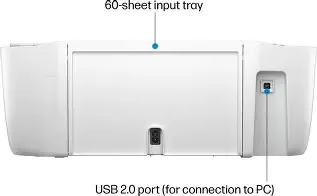
| Paper capacity | ~60 sheet input (typical) | ~60 sheet input (typical) |
| Ink cartridges | Standard and high‑yield color/black cartridges (manufacturer part family) | Same cartridge family as 2855E |
| Bundled services | Often sold as an “e” SKU with optional manufacturer cloud/subscription features | Often identical; differences depend on retailer/region |
| Regional differences | May vary by market (packaging, included paperwork) | May vary by market (packaging, included paperwork) |
| Verdict on differences | Core hardware is the same; differences are mostly bundle/firmware/marketing | Core hardware is the same; differences are mostly bundle/firmware/marketing |
Real‑world use cases and what buyers typically care about
Understanding how the DeskJet 2855E/2852E behaves in ordinary households helps clarify whether it is the right choice.
Students
Students benefit from the low cost and compact design. For printing essays, lab handouts, and presentation slides, the units do the job without fuss. Occasional scanning of assignments or pages is simple. Students should, however, factor in ink replacement costs if printing heavily during certain periods like finals or project deadlines.
Home offices
For a home office with light usage (invoices, contracts, a few pages per day), the DeskJet is acceptable. The limitation arises when larger print runs become routine. The small tray and lower speeds can impede productivity if a day requires dozens of pages. The lack of an ADF means scanning multi‑page documents is manual and time‑consuming.
Casual photo printing
Casual snapshots and family photos printed occasionally will be passable. Users who care deeply about color accuracy, archival longevity, or gallery‑quality prints will be disappointed. For occasional 4x6 or small prints, the device is adequate.
Families with mixed needs
Families juggling school worksheets, home administration, and photos will find the device convenient and inexpensive to own initially, but should plan for recurring ink purchases. Enrolling in a cartridge subscription might reduce anxiety about out‑of‑ink surprises, but subscriptions must be evaluated for cost against actual monthly need.
Buying guide: How to choose and what to watch for
When considering the DeskJet 2855E or 2852E, buyers should assess the following factors to avoid buyer’s remorse.
1. Monthly print volume
Estimate average monthly pages. If usage is low (under 100 pages per month), an entry‑level inkjet is reasonable. If printing frequently (several hundred pages per month), a laser or an ink‑tank printer is likely to be cheaper over time.
2. Running cost vs upfront cost
Compare the purchase price to cost per page estimates. Affordable printers often have higher consumable costs. Look for estimates of cartridge yield (standard vs high‑yield) and calculate a rough per‑page cost for black and color.
Find top-rated Electronics products at great prices.
Shop Amazon →3. Connectivity and ecosystem
Confirm that the printer supports the mobile and OS features the buyer needs (iOS AirPrint, Android printing, manufacturer app). If cloud printing or app features are important, check whether optional services require account registration or subscriptions.
4. Document handling needs
If multi‑page scanning, automatic duplexing, or large paper trays are required, the DeskJet’s minimal paper handling will be a bottleneck. For frequent scanning of multi‑page documents, prefer a model with an automatic document feeder (ADF).
5. Photo quality expectations
Determine whether occasional snapshots or serious photo printing is required. Casual prints are fine; anything beyond that favors a higher‑end inkjet or a dedicated photo printer.
6. Warranty and support
Check the manufacturer warranty period and what support is included. For buyers who depend on the device for work, an extended warranty or faster support options can be worth the extra cost.
7. Alternative technologies
Consider alternatives based on use case:
- Monochrome laser printers — lower per‑page cost for black text and higher speed for high volume.
- Ink‑tank printers — much lower running cost for frequent color printing and larger tray capacities.
- Higher‑end inkjets — better photo quality and advanced document handling if needed.
Practical tips for getting the best from these printers
- Print a small page or two every few days to keep ink nozzles from drying out.
- Buy at least one high‑yield cartridge if the user prints moderately often — it reduces replacement frequency.
- Use the HP Smart app (or equivalent) to simplify mobile printing and scanning workflows, but review any optional services before enrolling.
- Keep spare cartridges on hand if printing deadlines are time‑sensitive; substitution with third‑party cartridges can save money but may carry compatibility or quality tradeoffs.
- Place the printer on a stable surface and avoid blocking the output tray to minimize jams and mechanical stress.
Final verdict
The DeskJet 2855E and 2852E are straightforward, budget‑oriented multifunction printers that satisfy the needs of occasional home users, students, and very light home offices. Their strengths are affordability, compact size, ease of setup, and acceptable text quality for everyday tasks. However, their limitations are equally clear: relatively high long‑term ink costs, limited paper handling, modest print speeds, and restrained photo performance.
For buyers who prioritize a low upfront price and need a device for occasional printing, scanning and copying, these models are a sensible choice. For anyone whose work demands reliable high‑volume printing, frequent color output, multi‑page scanning, or professional photo quality, a different class of device will deliver a better total cost of ownership and user experience.
Ultimately, the DeskJet 2855E/2852E deliver what entry‑level inkjets have always offered: a practical, inexpensive solution for light tasks. The key question for a prospective buyer is not whether these printers can print, but whether they match the ongoing usage pattern and cost expectations. If they do, the buyer will be satisfied; if not, the small savings on purchase price will be outweighed by friction and expense down the road.